

Introducing AppSite Extensions
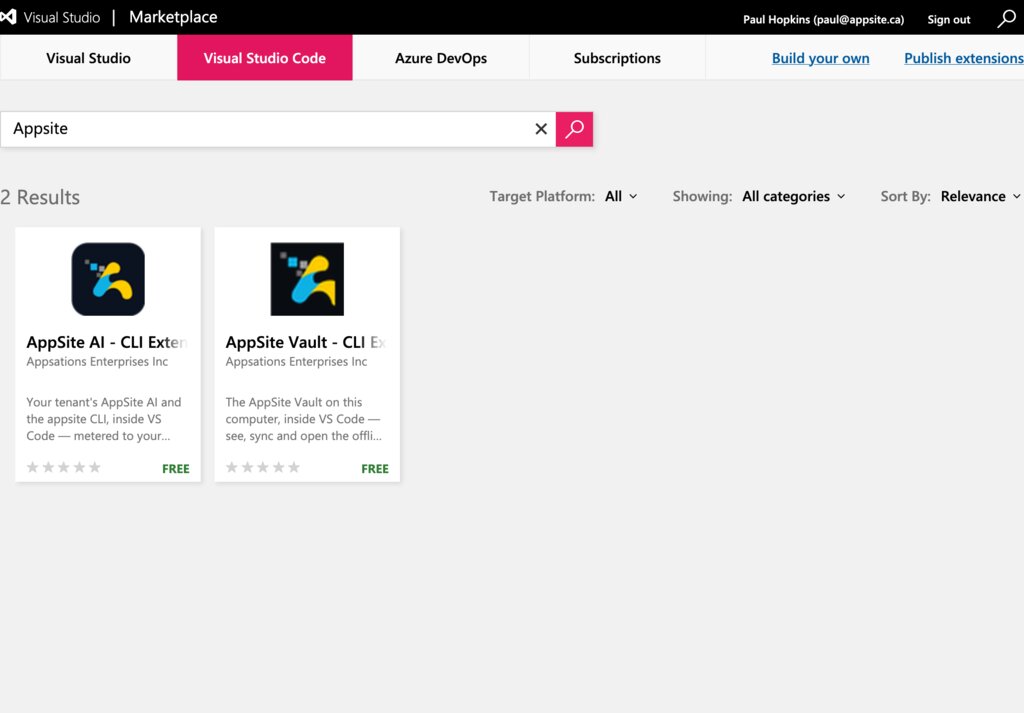
On October 13, 2026, AppSite's first two extensions went public on the Visual Studio Marketplace, published by Appsations, Inc. Open the Extensions view in VS Code, search AppSite, and both are there. Both are free.
Until now, AppSite was something you opened in a browser. These extensions put two parts of it inside the editor where code is written: AppSite AI and the AppSite Vault. It is a milestone for the platform.
Home base: the AI module
The extensions are listed in the AI module, under Connections → CLI extensions & Marketplaces: every AppSite extension, its current version, the file to download, and what each marketplace shows for it. Signing in from VS Code also goes through the AI module, and your tenant's owner or admin can see the tenant's signed-in installations there and revoke one.
AppSite AI — CLI Extension
Your tenant's AppSite AI and the appsite CLI, inside VS Code.
- Ask about your code. Select code and ask, or right-click for Ask, Explain, Write Tests or Find Bugs. It is the same AI service the AI module's own pages use, called as you.
- Or use your own plan. Switch to My CLI and the
appsiteCLI on your computer answers instead: on your Claude Code subscription, then Google's agy, GitHub Copilot or Codex. No tenant tokens are spent. - Type
/for commands./updatelists which of your tenant's modules have an update available./billingshows this period's AI usage from your tenant's meter. Commands are answered from your tenant's own records, cost no AI tokens, and a mistyped one is never sent to the model. - See what is sent. Before you send, the chat shows what goes with your question (the selection, or the open file) and roughly how many tokens it is. Obvious keys and tokens are removed first, and files that exist to hold secrets, such as
.envand*.pem, are never attached whole. - Work across tenants. Change Tenant… and Switch Account… are in the command palette.
Sign-in happens in your browser: type /signin, then press Connect VS Code in the AI module. Your session is kept in VS Code's secret storage (your operating system's keychain), and /logout removes it.
AppSite Vault — CLI Extension
The AppSite Vault on your computer, inside VS Code.
The Vault is the folder where AppSite keeps offline copies of what the modules register, such as Podcast recordings and their final renders, Podcast's data as readable JSON, and Gallery's artwork. It stays in two-way sync with the cloud, one folder per tenant. The appsite tool keeps the Vault; the extension shows what the tool reports and asks it to act. It never moves a file itself.
- See the state at a glance. A panel with a card per tenant, showing each feature's state with Sync and Plan buttons. A tree of what is on this computer, conflicts first. A status bar line that says what is waiting to pull or push, or that you are in step.
- Sync on your terms. A sync runs as a task in a terminal you can see and answer, and the tool asks before any upload and before a large download. Plan shows what a sync would do without moving anything.
- Settle conflicts. When both sides changed a file, both copies are kept. Compare them side by side, then keep this computer's version or the cloud's.
- Look without writing. Opening the panel reads this computer only, with no network and no sign-in. Check the Cloud only reads.
Get them
- In VS Code, open the Extensions view, search AppSite, and install AppSite AI - CLI Extension, AppSite Vault - CLI Extension, or both. Or start at appsite.ca/vscode.
- AppSite AI: click its icon in the activity bar, type
/signin, and press Connect VS Code. - AppSite Vault: install the
appsitetool from Connect a computer in the Vault module, rungcloud auth application-default loginonce, then click the AppSite icon in the activity bar.
Using an editor built on VS Code, such as Cursor, VSCodium or Windsurf? Those editors read a different store, Open VSX, where AppSite is not listed yet. Install the downloadable file instead, from Extensions → … → Install from VSIX…: AppSite AI · AppSite Vault.
Where things stand
- Both extensions have been tried in VS Code on macOS. The Windows and Linux installers for AppSite AI are tested but have not yet been run on those systems, and the other editors have not been tried.
- AppSite is not listed on Open VSX yet.
Both extensions are made by Appsations, Inc., British Columbia, Canada, for the AppSite project.